Most service businesses think they need more leads.
Usually, they need fewer leaks.
A surprising number of businesses spend money driving traffic, generating inquiries, posting content, running ads, and networking like caffeinated squirrels… only to lose leads because their CRM process is held together with sticky notes, memory, and optimism.
That is not a sales system.
That is administrative roulette.
The problem is not usually lead generation alone. The problem is what happens after someone raises their hand.
If your business has ever experienced these situations, your CRM process is probably leaking revenue:
- Someone fills out a form and never hears back
- A proposal gets sent and forgotten
- Leads disappear after a consultation
- Follow-ups happen inconsistently
- Different team members give different responses
- Nobody knows which leads are hot
- Old leads sit untouched in the CRM for months
- You manually move leads through every stage
This is where CRM automation changes the game.
A properly automated CRM system helps service businesses respond faster, follow up consistently, nurture leads intelligently, and convert more inquiries into paying clients — without relying on someone remembering to “check in later.”
And no, automation does not make your business robotic.
Bad automation does that.
Good automation makes your business feel more responsive, organized, and professional.
What Is CRM Automation?
CRM automation uses workflows, triggers, and integrations to automate parts of your sales and follow-up process.
Instead of manually managing every inquiry, your system handles repetitive actions automatically.
That can include:
- Sending follow-up emails
- Assigning leads to pipelines
- Triggering reminders
- Booking appointments
- Tagging lead behavior
- Moving contacts through sales stages
- Sending nurture campaigns
- Tracking conversions
- Re-engaging cold leads
At Kieffer Media, this approach aligns with the larger Revenue Engine strategy: building systems that capture, nurture, and convert leads more efficiently instead of relying on disconnected tools and reactive marketing.
Why Most Service Businesses Struggle With Lead Conversion
The average service business does not fail because people are uninterested.
They fail because the follow-up process creates friction.
Here are the most common CRM problems that quietly destroy conversion rates.
1. Slow Response Times
Speed matters more than most businesses realize.
When someone submits a form or requests information, they are actively thinking about solving a problem.
If your response arrives two days later, they may already:
- Hire someone else
- Lose urgency
- Forget they submitted the form
- Decide not to move forward
An automated CRM system can trigger immediate responses while your competitors are still looking for the email notification.
2. Inconsistent Follow-Up
Manual follow-up works until it doesn’t.
As soon as inquiries increase, things start slipping:
- Emails get missed
- Tasks get forgotten
- Follow-ups happen too late
- Leads go cold
- Opportunities disappear quietly
CRM automation creates consistency.
Not because humans are bad at sales, but because humans are bad at repetitive administrative tracking over long periods of time.
Especially on Fridays.
3. No Clear Lead Pipeline
Many businesses cannot clearly answer:
- What stage is this lead in?
- What happens next?
- Who owns this follow-up?
- Has this person been contacted?
- When should we follow up again?
That creates confusion internally and frustration externally.
A CRM pipeline gives every lead a defined stage and next step.
4. Generic Communication
Not every lead should receive the same message.
A new inquiry needs different communication than:
- A past client
- A booked consultation
- A no-show
- A proposal lead
- A cold prospect
- A referral lead
CRM automation allows segmentation based on behavior, source, and sales stage so communication feels relevant instead of random.
5. No Re-Engagement Strategy
Most businesses focus only on new leads.
Meanwhile, old leads quietly pile up in the CRM like abandoned gym memberships.
Many of those leads are still valuable.
They simply were not ready yet.
Automation gives you a way to restart conversations without manually revisiting every contact.
What CRM Automation Actually Looks Like
CRM automation is not just “sending emails automatically.”
That is the shallow end of the pool.
A modern automated CRM system connects multiple pieces of your marketing and sales process together.
Core Components of CRM Automation
Lead Capture Automation
When someone submits a form:
- The CRM creates a contact
- Tags the lead source
- Assigns a pipeline stage
- Sends a confirmation email
- Notifies the team
- Triggers follow-up workflows
No manual data entry required.
Which is nice because nobody starts a business dreaming about copy-pasting form submissions into spreadsheets.
Lead Nurture Automation
If the lead is not ready to buy immediately, the CRM can:
- Send educational emails
- Deliver lead magnets
- Share case studies
- Trigger reminders
- Invite consultations
- Segment by engagement
This keeps your business visible without manually chasing every lead.
Appointment Automation
Once someone books a call, your CRM can:
- Send confirmation emails
- Deliver calendar invites
- Trigger reminder texts
- Share prep instructions
- Assign sales tasks
- Move the lead to a new stage
This improves show-up rates and creates a smoother client experience.
Proposal Follow-Up Automation
One of the biggest revenue leaks happens after proposals are sent.
The CRM can automate:
- Proposal reminders
- Follow-up sequences
- Objection-handling emails
- Internal sales reminders
- Status tracking
Without automation, many proposals simply disappear into the void.
The void is undefeated.
Re-Engagement Automation
If a lead goes cold, your CRM can automatically trigger:
- Check-in emails
- New offers
- Educational content
- Funnel audit invitations
- Revenue Leak Finder promotions
This helps recover leads that otherwise would have been forgotten.
The Best CRM Automations for Service Businesses
Not every automation matters equally.
These are the highest-impact workflows for most service businesses.
1. Instant Inquiry Response Workflow
Trigger:
Website form submission
Automation:
- Send confirmation email immediately
- Assign lead source tag
- Create sales task
- Send booking link
- Notify team
Why It Matters:
Fast response times improve conversion rates dramatically.
Silence kills momentum.
2. Lead Magnet Delivery Workflow
Trigger:
Lead downloads a resource
Automation:
- Deliver the lead magnet
- Add nurture sequence
- Tag interest category
- Monitor engagement
- Invite consultation
Why It Matters:
Lead magnets should start conversations, not end them.
This works especially well with The Revenue Leak Finder, where the follow-up naturally transitions into funnel optimization and Revenue Engine conversations.
3. Consultation Booking Workflow
Trigger:
Lead books a discovery call
Automation:
- Send confirmation email
- Trigger reminders
- Share prep instructions
- Assign CRM stage
- Notify sales team
Why It Matters:
Better preparation creates better sales conversations.
4. Proposal Follow-Up Workflow
Trigger:
Proposal sent
Automation:
- Send recap email
- Trigger follow-up reminders
- Handle objections
- Notify team if proposal unopened
- Move lead stage automatically
Why It Matters:
Many deals are lost through weak follow-up, not weak offers.
5. Cold Lead Re-Engagement Workflow
Trigger:
No engagement after 30–90 days
Automation:
- Send check-in email
- Share updated resource
- Offer funnel audit
- Invite Revenue Leak Finder
- Restart nurture process
Why It Matters:
Old leads are often cheaper to convert than new ones.
You already paid to acquire them once.
CRM Automation and Funnel Optimization Work Together
A CRM without funnel optimization is basically an organized mess.
You may capture leads effectively, but if the overall customer journey has friction, automation alone will not save it.
Your funnel and CRM should work together.
Funnel Optimization Improves:
- Landing page conversions
- Form completion rates
- Consultation bookings
- Lead quality
- Email engagement
- Sales readiness
CRM Automation Improves:
- Follow-up consistency
- Lead nurturing
- Sales pipeline visibility
- Proposal follow-up
- Re-engagement
- Conversion tracking
Together, they create a complete Revenue Engine instead of disconnected marketing pieces.
How AI Improves CRM Automation
AI marketing systems are making CRM automation more effective and more personalized.
Not because robots are taking over.
Because repetitive administrative tasks are terrible uses of human time.
AI-assisted CRM systems can help with:
- Lead scoring
- Smart segmentation
- Follow-up recommendations
- Email personalization
- Predictive engagement
- Conversation summaries
- Workflow optimization
- Sales insights
The important distinction:
AI should support strategy, not replace it.
A broken sales process with AI sprinkled on top is still a broken sales process.
Now it just sounds more futuristic while failing.
Signs Your CRM System Is Costing You Revenue
Here are common warning signs.
Your Business May Need CRM Automation If:
- Leads wait hours or days for responses
- Follow-up depends on memory
- You manually send repetitive emails
- Leads disappear after consultations
- Your sales pipeline feels unclear
- Team communication is inconsistent
- Old leads never hear from you again
- You cannot easily track conversion rates
- Your CRM is mostly a digital storage closet
- You have no nurture sequences running
If multiple items on this list sound familiar, there is a good chance your sales process is leaking revenue every month.
How The Revenue Engine Connects CRM Automation
CRM automation works best when it is part of a larger system.
That system is the Revenue Engine.
Instead of treating marketing, sales, email, CRM, and follow-up as separate activities, the Revenue Engine connects them into one structured process.
That includes:
- Traffic generation
- Landing pages
- Lead magnets
- CRM workflows
- Email nurture systems
- Appointment booking
- Proposal follow-up
- Re-engagement campaigns
- Reporting and optimization
The goal is not “more automation.”
The goal is more consistent lead conversion.
Automation is just the vehicle.
A Simple CRM Automation Example
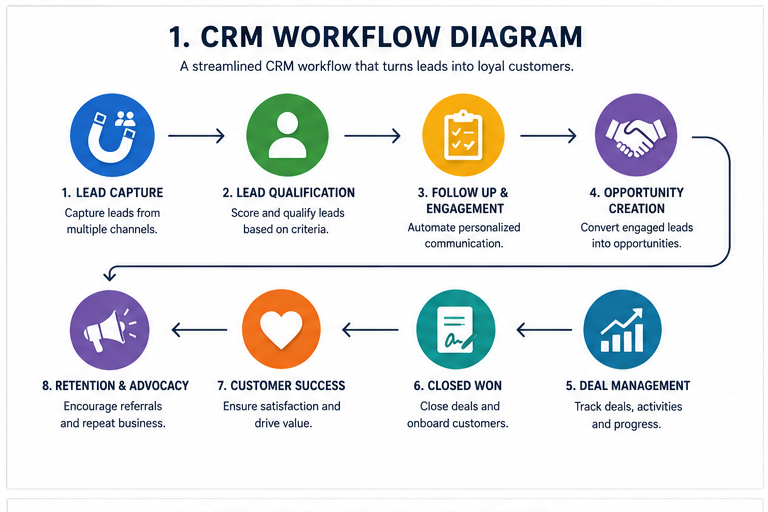
Here is what a streamlined service-business workflow might look like.
Step 1: Lead Captures Through Website
A visitor downloads The Revenue Leak Finder or submits a contact form.
Step 2: CRM Creates Contact Automatically
The system:
- Tags the lead source
- Adds them to a pipeline
- Starts a nurture sequence
- Sends confirmation email
Step 3: Lead Receives Educational Emails
The lead receives:
- Funnel optimization tips
- Follow-up insights
- Revenue leak examples
- Case studies
- Consultation invitations
Step 4: Lead Books a Call
The CRM:
- Sends reminders
- Updates pipeline stage
- Notifies the sales team
- Shares prep instructions
Step 5: Proposal Sent
The system:
- Tracks proposal engagement
- Sends reminders
- Triggers follow-up workflows
Step 6: Lead Converts or Enters Long-Term Nurture
Closed leads move into onboarding.
Unconverted leads move into re-engagement campaigns.
Nothing disappears.
That is the difference.
Common CRM Automation Mistakes
Even good businesses get these wrong.
Mistake 1: Automating Chaos
If your sales process is unclear, automation will scale the confusion.
Fix the process first.
Then automate it.
Mistake 2: Overcomplicating the Workflow
Some businesses create automation maps that look like conspiracy theory corkboards.
Start simple.
You can always expand later.
Mistake 3: Sounding Robotic
Automation should feel timely and helpful, not like a haunted autoresponder from 2009.
Write like a human.
Mistake 4: Ignoring Lead Segmentation
Different leads need different messaging.
Treating everyone the same lowers conversions.
Mistake 5: Never Reviewing Performance
Automation is not “set it and forget it.”
Monitor:
- Conversion rates
- Open rates
- Response times
- Booking rates
- Proposal close rates
- Pipeline movement
Optimization matters.
Your CRM Should Help You Close More Leads — Not Create More Work
If your follow-up process feels inconsistent, manual, or unclear, your business is probably losing revenue between inquiry and sale.
The good news is you do not necessarily need more traffic.
You need better systems.
Start with The Revenue Leak Finder to identify where leads are dropping off in your funnel, CRM, and follow-up process.
Then, if you want help building a smarter Revenue Engine with CRM automation, funnel optimization, and lead-conversion systems, Kieffer Media can help you put the right workflows in place.
Run The Revenue Leak Finder and discover where your sales process is leaking revenue.